
Charge any Foger vape with a standard USB-C cable and a 5V/1A adapter — avoid fast chargers above 2.4A. The Bit 35K and Switch Pro both take 40-50 minutes for a full charge. If it won't charge, clean pocket lint from the port and try a different cable.
Nothing kills the vibe faster than a dead vape blinking red at you. If you are frantically searching for a “Foger Vape Charger” or wondering why your device isn’t powering up, you aren’t alone. While vaping technology has evolved into advanced modular systems, battery chemistry remains delicate.
💡 Need a New Foger Vape Magnetic Charger?
Stop fighting with broken cables. The Foger Switch Pro uses a reusable Magnetic Power Bank that acts as your portable charger. Don’t just buy a cable—upgrade your entire power system.
Whether you are rocking the modular Switch Pro 30K or the all-in-one Bit 35K, properly charging your device is the difference between a vape that lasts 30,000 puffs and one that dies in a week. This guide covers everything from foger vape charger types to voltage science.

🤓 Nerd Corner: Why Do Fast Chargers Fail? (The “Handshake” Issue)
You might wonder: “My iPhone charger is smart, shouldn’t it auto-adjust?”
Here is the technical reality. Modern USB-C Power Delivery (PD) chargers require a digital “handshake” with the device to negotiate voltage (5V, 9V, 12V, or 20V).
Most disposable vapes, to keep costs affordable, lack the expensive Power Management IC (PMIC) needed for this negotiation. When you plug a Foger Bit 35K into a 65W laptop brick, one of two things happens:
- Scenario A (The Ghost Charge): The charger waits for a handshake that never comes, so it sends zero power.
- Scenario B (The Fryer): The charger defaults to a higher voltage profile, overwhelming the vape’s basic protection circuit.
The Takeaway: Dumb chargers (5V/1A) work best because they don’t wait for a handshake—they just give power.
Where to Buy a Foger Vape Charger?
Stop looking for cheap cables. The Foger Switch Pro uses a specialized reusable Magnetic Power Bank. It acts as your portable charger and battery in one.
*Includes 1x Magnetic Battery Dock (Charger) + 1x Flavor Pod.
The “Foger Vape Charger” Myth: What Hardware Do You Actually Need?
First, let’s clear up a misconception. You don’t generally need to buy a proprietary “Foger Charger” cable for $20. Foger devices use the universal industry standard: USB Type-C.
However, not all USB-C cables are created equal. Here is the golden rule for charging lithium-ion vape batteries:
⚡ Low and Slow is the Way to Go.
Most disposable vape failures happen because users plug them into high-wattage laptop chargers (65W+) or “Fast Charge” phone blocks.
The Foger Bit 35K and Switch Pro utilize an 850mAh battery. Blasting it with high voltage can trigger the internal safety chip to lock the device.
Recommended Charging Specs:
- Cable: Standard USB-C cable (usually not included in the flavor pod box).
- Power Source: A PC USB port, a gaming console, or a standard 5V/1A wall block.
- Current: Avoid chargers rated above 2.4A output.
Deep Dive: The Foger Magnetic Charger Technology
One of the most frequent searches we see is for the “magnetic charger for Foger vape”. This refers specifically to the revolutionary Foger Switch Pro 30K system. Unlike traditional disposables where the port wears out, the Switch Pro uses a modular design.
🧲 Why Magnetic?
The Foger Magnetic Power Bank snaps onto the pod. This isolates the battery from the e-liquid, preventing leaks from destroying the charging circuitry—a common issue in all-in-one vapes.
🔌 Universal Port
The magnetic dock itself charges via USB-C. You charge the dock, and the dock powers the pod. This acts as a buffer, protecting your flavor pod from direct electrical surges.
How to Charge a Foger Vape: Step-by-Step
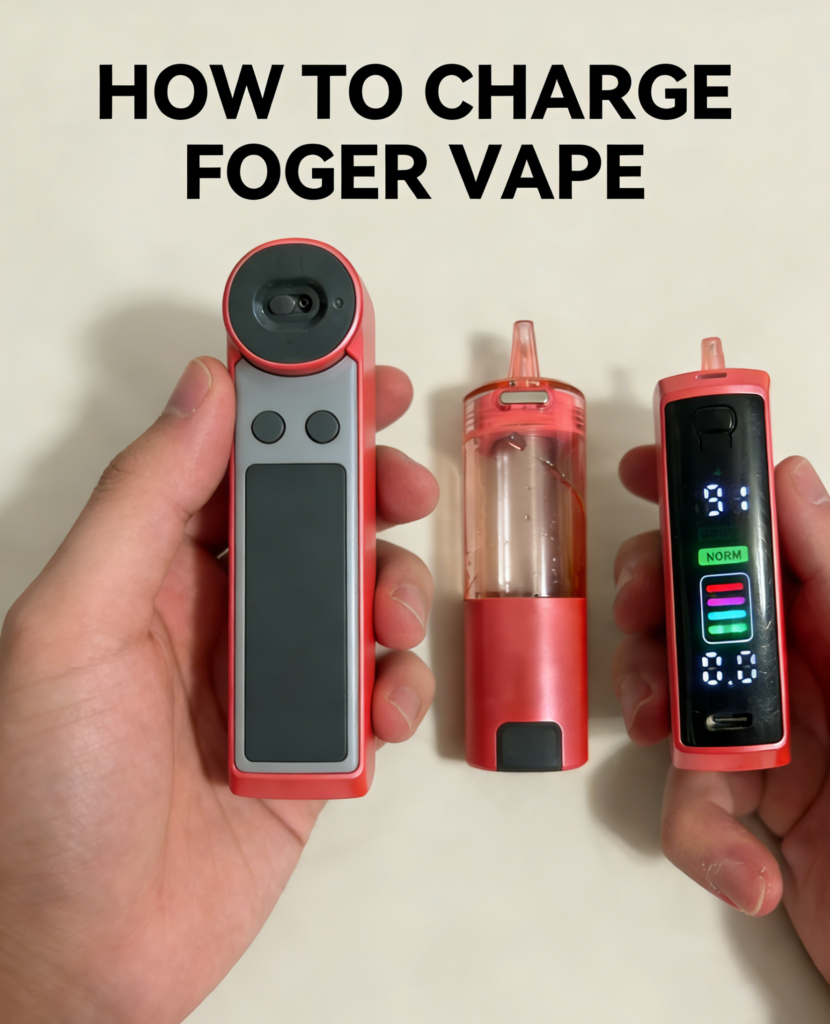
Wondering how to charge Foger vape devices correctly? Whether you have the modular Switch Pro or the all-in-one Bit 35K, following the correct protocol is key to battery longevity.
1. Charging the Foger Switch Pro (The Magnetic Dock System)
The Foger Switch Pro 30K Kit is unique. It consists of a reusable Magnetic Power Bank (Dock) and a separate flavor pod.
- Step 1: Snap the pod onto the magnetic battery dock. Feel the magnets align.
- Step 2: Plug your USB-C cable into the bottom port of the Power Bank (not the pod, as the pod has no port).
- Step 3: Watch the Smart Screen. It will display the battery percentage ticking up.
- Important: If you bought just the Replacement Pods (Refills), remember that the pod itself has a tiny 200mAh emergency battery, but it cannot be recharged directly. You MUST have the magnetic dock.
🔧 Pro Tip: Maintaining Your Magnetic Connection
Since the Switch Pro uses gold-plated magnetic pins, they can accumulate dust or oxidized e-liquid over time. If your pod isn’t snapping in or charging:
- Dip a cotton swab (Q-Tip) in high-percentage Isopropyl Alcohol.
- Gently scrub the gold pins on both the battery dock and the pod base.
- Wait 30 seconds for it to dry.
This simple maintenance can extend the life of your foger magnetic charger system by months.
2. Charging the Foger Bit 35K (All-in-One)
This device features a “Bitcoin” style transparent screen and an integrated battery.
- Plug the cable into the bottom USB-C port.
- The screen will illuminate, showing a lightning bolt icon and the current percentage.
- Once it hits 100%, disconnect it. Leaving it plugged in overnight can degrade battery chemistry.
⚠️ Safety First: Read This!
Never charge a vape on a flammable surface like a bed or couch. Always charge on a desk or counter. For detailed safety protocols, please visit our dedicated Ingredients & Safety Guide.
Troubleshooting: Why Isn’t My Foger Vape Charging?
We analyzed customer support data from over 5,000 interactions. Here are the top 3 reasons why a device stops taking a charge, and how to fix them.
Issue #1: The “Pocket Lint” Blocker (40% of cases)
If you carry your vape in your pocket, lint gets jammed into the USB-C port. This prevents the cable from making a solid connection.
Fix: Use a non-conductive tool (like a wooden toothpick) to gently scrape out the port. You will be surprised at what comes out.
Issue #2: The “Over-Voltage” Lockout (30% of cases)
As mentioned earlier, using a high-speed charger can cause the device’s MCU (Microcontroller Unit) to shut down to protect the battery.
Fix: Leave the device unplugged for 30 minutes to reset the chip. Then, try plugging it into a slow source, like a laptop USB port, using a basic cable.
Issue #3: The “Dud” Cable
It sounds obvious, but many generic USB cables fail internally.
Fix: Try a different cable before assuming the vape is broken. If your magnetic dock is dead, grab a replacement below.
Quick Reference: Charging Time & Specs
Different Foger models have different battery architectures. For a detailed breakdown of how long each battery lasts and maintenance tips, see our Foger Vape Battery Guide. Here is your cheat sheet.
| Device Model | Battery Capacity | Charging Port | Time to 100% |
|---|---|---|---|
| Foger Bit 35K | 850mAh | USB-C (Bottom) | ~50 Mins |
| Switch Pro (Dock) | 850mAh (External) | Magnetic / USB-C | ~45 Mins |
| CT10000 | 650mAh | USB-C | ~40 Mins |
Data Insight: Battery Life vs. Cost
Why do we emphasize proper charging? Because it saves you money. A properly maintained Switch Pro Battery can last for months of recharging cycles.
According to battery degradation data from the CDC’s E-cigarette Information, lithium-ion batteries lose about 20% of their capacity after 300 charge cycles. However, since the Switch Pro is a modular system, even if the battery eventually degrades, you haven’t wasted money on the e-liquid.
- Disposable Cost: Throwing away the battery every time = $20 per 5k puffs.
- Rechargeable Cost (Switch Pro): Keeping the battery healthy = $16 per 30k puffs (Cost of a Refill Pod).
Common Charging Questions (FAQ)
▶ How long does it take to charge a Foger Vape?
For the Foger Switch Pro and Bit 35K, a full charge typically takes 40 to 50 minutes using a standard USB-C cable. The OLED screen will display 100% when complete.
▶ Why is my Foger Vape blinking when I plug it in?
A blinking light usually indicates a connection error or a completed charge. If it blinks red and won’t charge, try using a different cable (low-wattage) and clean the charging port of lint. For a full breakdown of Switch Pro blink patterns and error codes, see our blinking 188 fix guide.
▶ Can I use an iPhone fast charger for my Foger Vape?
We do not recommend it. High-wattage chargers (like Apple USB-C blocks) output too much power for the 850mAh battery in vapes. This can trigger the safety cutoff. Use a standard 5V/1A wall adapter or computer port instead.
▶ Do you sell a Foger Vape magnetic charger replacement?
Yes, the Foger Switch Pro Kit includes the magnetic power bank. If you lost yours, you can purchase a new Switch Pro Kit here which acts as your replacement charger.
Conclusion
You don’t need a special “Foger Vape Charger” cable, but you do need the right magnetic power bank if you are using the Switch Pro. Treat your battery right—don’t overcharge it, don’t use high-voltage bricks—and it will deliver consistent flavor until the very last drop.
Is your device charged and ready?
Pair that full battery with our top-rated e-liquids.